Invoice Simple: Invoice Maker
- 4.8
- Rating
- 5.00M
- Installs
- Free
- Price

 Analysis by App-foxy
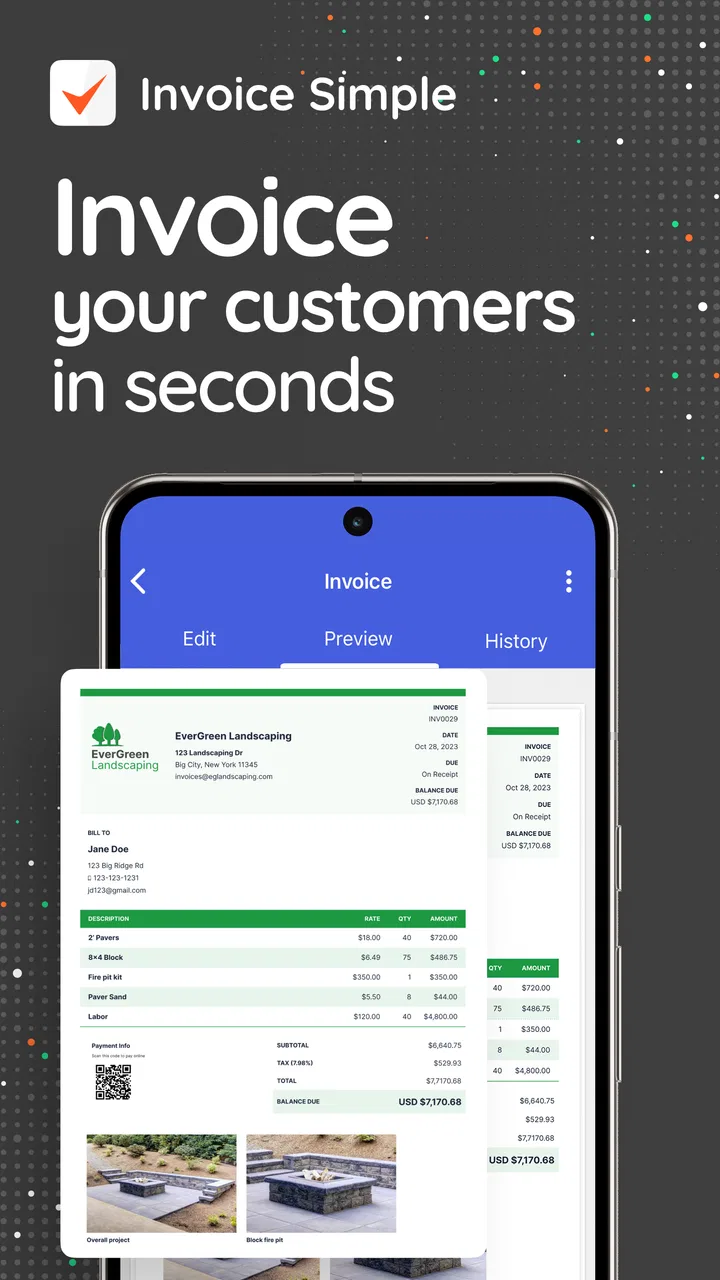
When I need to send a clean bill without opening a complicated accounting system, Invoice Simple: Invoice Maker is the kind of app I reach for first. It is a business app from Invoice Simple that focuses on the practical middle ground between a handwritten receipt and full bookkeeping software. I can create an invoice, estimate, bill, or receipt from a phone, adjust the details, and keep the process moving instead of turning a small job into an administrative project.
That focused approach is the main reason I find it useful. It does not try to replace every financial tool a business might need. Instead, it makes the document itself the center of the experience. For a freelancer, tradesperson, tutor, cleaner, consultant, or small shop owner, that can be exactly the right level of organization. The app is free to install, suitable for Everyone, and its current version is 5.12.1, while optional in-app purchases range from $4.99 to $323.99 per item.
Why this invoice app works well in everyday business
The first impression is straightforward: I am not forced to learn an accounting vocabulary before I can prepare a charge for a customer. The store summary describes its purpose clearly, but the real benefit is how little distance there is between finishing work and documenting it. I can think in terms of a client, a service, a quantity, and a total rather than navigating a large collection of financial menus.
You May Also Like

 Blood Strike: 2.5 Anniversary
Blood Strike’s Loadouts Turn Every Drop Into a Tactical Gamble
A close look at Blood Strike’s custom loadouts: how fast access to signature weapons reshapes its battle royale rhythm, rewards preparation, and narrows the gap between fights.

 Pandora - Music & Podcasts
Pandora’s Music Is Easy to Start, but Harder to Recover
Pandora’s strength is its low-effort path from a seed to a station. Its weak spot is how much confidence it asks you to place in connection, setup, and quiet recovery.

 8 Ball Pool
 Is Built on Rivalries, Rematches, and Routine
A close look at the rivalries, rematches, shared routines, and unanswered safety questions that turn a quick pool match into a persistent mobile community.

 Samsung Music
’s Quiet Strength Is Playing What You Already Own
Its reach comes less from spectacle than from dependable access to a personal library. That simplicity is both the app’s strongest retention engine and its ceiling.

 AccuWeather: Weather Radar
AccuWeather Review: A Quick, Clear Forecast for Everyday Decisions
For everyday plans, the best forecast is the one you can understand quickly. AccuWeather makes rain timing, radar, and local conditions easy to act on, with a few trade-offs.

 Hill Climb Racing
Why Hill Climb Racing Still Turns Crashes Into One More Run
A tiny car, a bumpy hill and one more upgrade: Hill Climb Racing keeps resurfacing because its simple chaos makes every near-miss feel personal.
More From Our News Desk



That simplicity matters most when I am working away from a desk. Imagine a self-employed electrician finishing a repair in the afternoon. The customer wants a written record before leaving, but the electrician is standing beside a van with only a phone available. A dedicated invoice app is more practical than waiting until evening, remembering the materials, and rebuilding the job from scraps of paper. The invoice can be prepared while the details are still fresh, which reduces the risk of forgetting a line item or misstating the amount.
I also like the separation between an estimate and a final invoice. That is more than a cosmetic distinction. An estimate lets me describe expected work before the customer commits, while an invoice records what is actually due. Keeping those stages distinct helps avoid a common small-business mistake: sending a document that looks like a bill when the price was only provisional. For jobs that change during the work, this distinction gives the conversation a clearer paper trail.
The same principle applies to receipts. A receipt is not simply an invoice with a different heading; it confirms that money has been received. Having a tool designed around these different document types makes the app more useful than a generic notes app or a manually edited word-processing template. I spend less time formatting and more time checking whether the description and total accurately reflect the transaction.
There is also a practical advantage in starting with a purpose-built document rather than a blank page. A blank template invites omissions. I might remember the customer and price but forget to identify the service, include a due date, or make the document easy to recognize later. Invoice Simple: Invoice Maker gives the task a defined shape, so I can concentrate on the information that matters instead of designing the structure from scratch each time.
A useful workflow for estimates, jobs, and payment records
My preferred workflow is to prepare the estimate before the work begins, revise the actual line items as the job develops, and then create the invoice from the finished details. That approach is especially helpful for service work where the final amount depends on time or materials. I can use the estimate as a reference without confusing it with the amount the customer ultimately owes.
One less obvious benefit is consistency. Even if I am the only person in the business, repeating the same process makes my records easier to understand later. I can look at a document and quickly see whether it was a proposal, a request for payment, or proof of payment. That is valuable when a customer asks about an old job or when I am reviewing several projects at once.
I would not treat the app as a substitute for a complete accounting routine, but it can act as a reliable front end for one. I can prepare the customer-facing document here, then keep broader financial records elsewhere if my business requires them. This division of labor is sensible: the app handles quick document creation, while a spreadsheet, accountant, or larger business platform handles taxes, reconciliation, and long-term reporting.
That trade-off is important. People often expect a business app to solve every financial problem once they see words such as invoice and bill. In my experience, the strongest use of this app is narrower and more realistic: produce clear documents quickly, keep the transaction organized, and avoid unnecessary paperwork. If I need deep accounting controls, I should choose a tool built for that from the beginning rather than becoming frustrated when a lightweight invoice maker does not behave like an enterprise system.
Small habits that make the app more dependable
The best results come from treating each invoice as a communication document, not just a number generator. I make the service description specific enough that the customer can recognize the work without calling me for clarification. “Repair” is weaker than a short description of what was repaired. This is a simple habit, but it improves the usefulness of the document more than adding decorative formatting.
I also check the total before sending anything, particularly after changing quantities or adding materials. Mobile entry is convenient, but convenience can encourage rushing. A quick review of the customer details, line items, amount, and document type prevents the most embarrassing errors. The app reduces formatting work; it does not remove the need for a final human check.
Another useful habit is to create the document immediately after the job or payment event rather than leaving it for the end of the week. I find that this keeps descriptions more accurate and makes receipts more meaningful. For a business with many small jobs, the time saved is not only the time spent typing. It is also the time spent reconstructing what happened later.
For recurring work, I would keep the wording of services consistent while still adapting it to the specific customer. Consistent descriptions make a series of invoices easier to compare, but copying without checking can create mistakes when a job changes. The app is most effective when it supports a repeatable routine without turning that routine into blind automation.
Where the experience can become limiting
The same simplicity that makes the app approachable can feel restrictive for a growing business. If I need detailed financial reporting, inventory management, advanced tax workflows, extensive team permissions, or a full view of money moving through the business, I would look beyond a focused invoice creator. An app centered on documents is not automatically a complete business management system.
There is also a cost decision to make after the free starting point. The app is listed as free, but optional purchases are available, and the highest listed per-item price reaches $323.99. That does not make the app a poor choice, but it does mean I would inspect the purchase screen carefully before committing to a workflow. A solo worker who only needs occasional invoices may find the free experience sufficient, while a busy business should compare the paid options with the cost of competing accounting services.
I would also be cautious about relying on a phone-only process for a large archive. Mobile creation is excellent for speed, but reviewing years of documents, checking patterns, or preparing information for an accountant may be easier in a broader system. The app can be part of a record-keeping process, but I would not let it become the only place where important financial information exists without a backup habit.
Another limitation is that straightforward tools leave more responsibility with the user. The app can help me produce a professional-looking document, but it cannot decide whether my wording is legally appropriate for a particular type of work, whether my tax treatment is correct, or whether a customer dispute requires formal documentation. Those questions belong to local rules and professional advice, not to the invoice screen.
This is why I would not recommend it automatically to every business owner. A company with several employees, complicated billing arrangements, or a need to connect invoices with inventory and accounts may outgrow it quickly. In that situation, an integrated accounting platform is likely the better investment, even if it takes longer to learn. Invoice Simple is strongest when speed and clarity matter more than a large administrative feature set.
Who should use it and who should choose something else
I think the app is particularly well suited to people who invoice directly from their phones. Independent contractors, home-service providers, photographers, tutors, designers, repair workers, and occasional sellers can benefit from having estimates, invoices, bills, and receipts in one focused place. It is also a reasonable starting point for someone who has been using improvised documents and wants a more orderly process without immediately adopting full accounting software.
It can work for a small team as well, provided the team’s needs are mainly document creation rather than centralized financial control. If several people only need to produce consistent customer documents, a focused tool may be easier to introduce than a complicated platform. However, I would evaluate how the business will review, store, and reconcile those documents before making it the foundation of a larger operation.
The age rating of Everyone makes the app broadly approachable, but that should not be confused with suitability for every professional situation. A beginner can understand the basic purpose quickly, yet a beginner who has never handled invoices may still need to learn what information customers expect and how local business rules work. The app lowers the technical barrier; it does not replace business judgment.
I would skip it if my main goal were detailed bookkeeping rather than creating customer-facing documents. I would also compare alternatives if I need a desktop-first workflow, extensive automation, advanced reporting, or close integration with stock and payments. A spreadsheet can be cheaper and more flexible for someone who enjoys building their own system, while full accounting software is more appropriate when invoices are only one part of a larger financial operation.
Compared with a blank document template, this app is quicker and less error-prone because the task already has a business structure. Compared with a full accounting suite, it is easier to approach but less comprehensive. That is the clearest way to understand its position: it is not trying to win by doing everything. It wins when I need a polished, recognizable business document without a long setup process.
What I would check before relying on it
Before using it for regular work, I would create a sample estimate and a sample invoice, then read both as if I were the customer. I would check whether the service description is clear, whether the document type matches the situation, and whether the total is easy to find. This test reveals more than simply opening the app and deciding that the layout looks pleasant.
I would also decide where the records will live after they are created. For occasional work, my process might be simple. For frequent invoicing, I would establish a naming and storage routine outside the moment of creation so that old documents remain easy to locate. This is one of the most important practical trade-offs: the app can make production fast, but a business still needs a deliberate archive.
When considering optional purchases, I would compare the feature or capacity I actually need with my monthly or yearly workload. Someone sending a few invoices may value the free entry point differently from a contractor sending documents every day. The listed purchase range is wide enough that I would avoid assuming the most expensive option is necessary simply because the business is growing.
Device compatibility is also worth checking before installation. The app supports Android devices running version 7.0 or later, which covers a broad range of phones, but an older device can still affect comfort, speed, and screen space. A small screen is workable for a short invoice, yet detailed line items deserve extra attention. I would prepare a realistic sample rather than judging the experience from a single short document.
My final view after using it
Invoice Simple: Invoice Maker succeeds because it understands a common small-business problem: I often need a credible invoice now, not a complete lesson in accounting. Its strongest qualities are focus, accessibility, and the ability to support several stages of a customer transaction, from estimate to invoice to receipt. The app has also built substantial public trust, with a 4.8 average from around 165 thousand ratings and over 5 million installs.
Those figures do not guarantee that it will fit every workflow, but they match my overall impression that this is a mature and widely used option rather than an experimental utility. Invoice Simple was released on February 1, 2013, and the current version shows that the product continues to be maintained as a practical business tool. I would still judge it by my own requirements, especially around paid options and record management.
My recommendation is clear: choose it if your priority is producing estimates, invoices, bills, and receipts quickly from a mobile device, and if you are comfortable keeping broader accounting tasks somewhere else. It is especially appealing for solo professionals who want to look organized without adding a heavy system to every job.
If your business has moved into complex bookkeeping, inventory, payroll, multiple approval layers, or detailed financial analysis, I would choose a fuller platform instead. But for the everyday moment when a customer needs a clear document and I need to create it without fuss, this app earns its place. Its real strength is not doing everything; it is making the essential paperwork feel manageable.
FAQs for Invoice Simple: Invoice Maker
01What features does Invoice Simple: Invoice Maker offer?
Invoice Simple: Invoice Maker provides a range of features designed to make invoicing easy for small businesses and freelancers. Users can create and send professional invoices, estimates, and receipts in just a few taps. The app offers customization options for branding, automatic tax calculation, and supports multiple currencies. Additionally, it allows for easy tracking of expenses, payments, and overdue invoices.
02Is Invoice Simple: Invoice Maker user-friendly for beginners?
Yes, Invoice Simple: Invoice Maker is highly user-friendly, making it ideal for beginners. The app features an intuitive interface with straightforward navigation, allowing users to create invoices quickly without any prior experience. It includes helpful templates and tips to guide new users through the invoicing process, ensuring a smooth and efficient experience.
03Does Invoice Simple: Invoice Maker support different currencies?
Absolutely, Invoice Simple supports multiple currencies, making it suitable for businesses with international clients. Users can easily switch between different currencies while creating invoices, ensuring accurate billing. The app automatically updates exchange rates, providing real-time currency conversion and helping businesses manage international transactions effortlessly.
04How secure is my data with Invoice Simple: Invoice Maker?
Invoice Simple takes data security seriously. It uses encryption to protect sensitive information and ensures that user data is stored securely. Regular updates and compliance with data protection regulations enhance security further. Users can confidently store financial data, trusting that their information is safeguarded against unauthorized access.
05Can I use Invoice Simple: Invoice Maker offline?
Yes, Invoice Simple: Invoice Maker can be used offline, allowing users to create and edit invoices even without an internet connection. Once the device reconnects to the internet, all updates and changes are synchronized automatically. This feature is particularly beneficial for users who need to work on the go or in areas with limited connectivity.
Pros
- User-friendly interface
- easy to navigate.
- Customizable templates for invoices.
- Supports multiple currencies and languages.
- Works offline for on-the-go invoicing.
- Integrates with payment platforms.
Cons
- Limited free version features.
- No comprehensive accounting tools.
- Occasional sync issues.
- Subscription can be costly for small businesses.
- No advanced reporting options.

Invoice Simple: Invoice Maker
Gallery